# Import the Fashion MNIST dataset
fashion_mnist=keras.datasets.fashion_mnist
# Loading the dataset returns 4 Numpy arrays
(train_images,train_labels),(test_images,test_labels)=fashion_mnist.load_data()
# The images are 28x28 numpy arrays,with pixel values ranging from 0 to 255.
print("train_iamges.shape:",train_images.shape)
# The labels are an array of integers, ranging from 0 to 9.These correspond to the class of clothing the image represents:
# 0:T-shirt/top
# 1:Trouser
# 2:Pullover
# 3:Dress
# 4:Coat
# 5:Sandal
# 6:Shirt
# 7:Sneaker
# 8:Bag
# 9:Ankle boot
print("train_labels.shape:",train_labels.shape)
train_iamges.shape: (60000, 28, 28)
train_labels.shape: (60000,)
# storage the 10 classes into a list
class_names=['T-shirt/top','Trouser','Pullover','Dress','Coat','Sandal','Shirt','Sneaker','Bag','Ankle boot']
def display_images(images,image_num,labels):
    plt.figure(figsize=(10,10))
    for i in range(image_num):
        plt.subplot(5,5,i+1)
        plt.xticks([])
        plt.yticks([])
        plt.grid(False)
        plt.imshow(images[i],cmap=plt.cm.binary)
        plt.xlabel(class_names[labels[i]])
    plt.show()

display_images(train_images,25,train_labels)
Model: "sequential_2"
_________________________________________________________________
Layer (type)                 Output Shape              Param #
=================================================================
flatten_2 (Flatten)          (None, 784)               0
_________________________________________________________________
dense_4 (Dense)              (None, 128)               100480
_________________________________________________________________
dense_5 (Dense)              (None, 10)                1290
=================================================================
Total params: 101,770
Trainable params: 101,770
Non-trainable params: 0
_________________________________________________________________
Train on 60000 samples
Epoch 1/20
60000/60000 [==============================] - 4s 60us/sample - loss: 0.4962 - accuracy: 0.8241
Epoch 2/20
60000/60000 [==============================] - 4s 59us/sample - loss: 0.3726 - accuracy: 0.8652
Epoch 3/20
60000/60000 [==============================] - 4s 58us/sample - loss: 0.3351 - accuracy: 0.8775
Epoch 4/20
60000/60000 [==============================] - 4s 64us/sample - loss: 0.3112 - accuracy: 0.8855
Epoch 5/20
60000/60000 [==============================] - 4s 59us/sample - loss: 0.2937 - accuracy: 0.8918
Epoch 6/20
60000/60000 [==============================] - 4s 61us/sample - loss: 0.2792 - accuracy: 0.8968
Epoch 7/20
60000/60000 [==============================] - 4s 66us/sample - loss: 0.2678 - accuracy: 0.9007
Epoch 8/20
60000/60000 [==============================] - 4s 66us/sample - loss: 0.2577 - accuracy: 0.9039
Epoch 9/20
60000/60000 [==============================] - 4s 68us/sample - loss: 0.2487 - accuracy: 0.9082
Epoch 10/20
60000/60000 [==============================] - 4s 71us/sample - loss: 0.2407 - accuracy: 0.9096
Epoch 11/20
60000/60000 [==============================] - 4s 66us/sample - loss: 0.2309 - accuracy: 0.9141
Epoch 12/20
60000/60000 [==============================] - 4s 66us/sample - loss: 0.2225 - accuracy: 0.9161
Epoch 13/20
60000/60000 [==============================] - 4s 66us/sample - loss: 0.2177 - accuracy: 0.9175
Epoch 14/20
60000/60000 [==============================] - 4s 66us/sample - loss: 0.2118 - accuracy: 0.9204
Epoch 15/20
60000/60000 [==============================] - 4s 64us/sample - loss: 0.2036 - accuracy: 0.9235
Epoch 16/20
60000/60000 [==============================] - 4s 64us/sample - loss: 0.2001 - accuracy: 0.9235
Epoch 17/20
60000/60000 [==============================] - 4s 68us/sample - loss: 0.1956 - accuracy: 0.9267
Epoch 18/20
60000/60000 [==============================] - 4s 69us/sample - loss: 0.1887 - accuracy: 0.9280
Epoch 19/20
60000/60000 [==============================] - 4s 66us/sample - loss: 0.1848 - accuracy: 0.9298
Epoch 20/20
60000/60000 [==============================] - 4s 64us/sample - loss: 0.1787 - accuracy: 0.9327


<tensorflow.python.keras.callbacks.History at 0x17d92e2be48>
10000/10000 - 1s - loss: 0.3490 - accuracy: 0.8896

Test accuracy: 0.8896
array([1.5950793e-10, 3.4406789e-10, 2.1609357e-13, 3.8774634e-14,
       1.3165631e-11, 6.1470637e-05, 3.0008304e-10, 4.6707969e-03,
       4.1768186e-12, 9.9526775e-01], dtype=float32)
prediction_label: 9
true_label: 9
def plot_image(i, predictions_array, true_label, img):
  predictions_array, true_label, img = predictions_array, true_label[i], img[i]
  plt.grid(False)
  plt.xticks([])
  plt.yticks([])

  plt.imshow(img, cmap=plt.cm.binary)

  predicted_label = np.argmax(predictions_array)
  if predicted_label == true_label:
    color = 'blue'
  else:
    color = 'red'

  plt.xlabel("{} {:2.0f}% ({})".format(class_names[predicted_label],
                                100*np.max(predictions_array),
                                class_names[true_label]),
                                color=color)

def plot_value_array(i, predictions_array, true_label):
  predictions_array, true_label = predictions_array, true_label[i]
  plt.grid(False)
  plt.xticks(range(10))
  plt.yticks([])
  thisplot = plt.bar(range(10), predictions_array, color="#777777")
  plt.ylim([0, 1])
  predicted_label = np.argmax(predictions_array)

  thisplot[predicted_label].set_color('red')
  thisplot[true_label].set_color('blue')
i = 0
plt.figure(figsize=(6,3))
plt.subplot(1,2,1)
plot_image(i, predictions[i], test_labels, test_images)
plt.subplot(1,2,2)
plot_value_array(i, predictions[i],  test_labels)
plt.show()
i = 12
plt.figure(figsize=(6,3))
plt.subplot(1,2,1)
plot_image(i, predictions[i], test_labels, test_images)
plt.subplot(1,2,2)
plot_value_array(i, predictions[i],  test_labels)
plt.show()
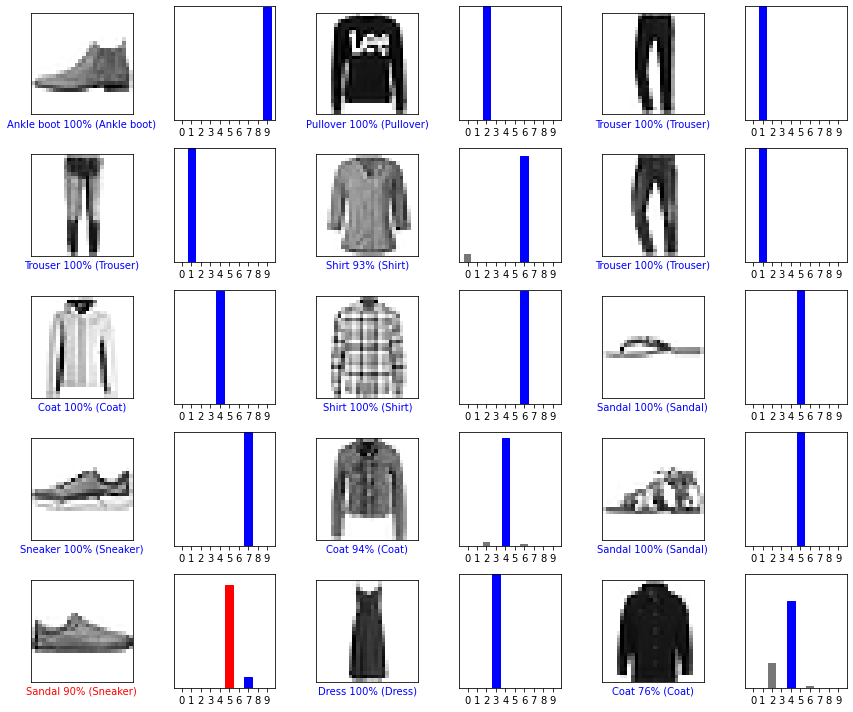
# Plot the first X test images, their predicted labels, and the true labels.
# Color correct predictions in blue and incorrect predictions in red.
num_rows = 5
num_cols = 3
num_images = num_rows*num_cols
plt.figure(figsize=(2*2*num_cols, 2*num_rows))
for i in range(num_images):
  plt.subplot(num_rows, 2*num_cols, 2*i+1)
  plot_image(i, predictions[i], test_labels, test_images)
  plt.subplot(num_rows, 2*num_cols, 2*i+2)
  plot_value_array(i, predictions[i], test_labels)
plt.tight_layout()
plt.show()
[[1.2396064e-08 1.0000000e+00 1.0325842e-11 2.1302677e-09 6.1361333e-13
  1.1962000e-22 5.7414910e-11 3.9591402e-36 7.7304123e-15 1.0569104e-25]]
prediction_label: 1
true_label: 1